


Download Sothink SWF Decompiler – SWF decompiler, Flash decompiler, convert SWF to HTML5, extract Flash elements, online Flash downloader
Overview
Sothink SWF Decompiler is a specialized utility designed for professionals and enthusiasts working with Adobe Flash content. The app serves as a comprehensive solution for decompiling SWF files, enabling users to convert them into modern formats such as HTML5, FLA, and FLEX. Its primary purpose is to preserve and repurpose legacy Flash assets, which is increasingly important as Flash support diminishes across modern web platforms. The tool addresses the growing need for content migration, allowing developers and designers to extract and edit elements like shapes, images, sounds, videos, fonts, buttons, and ActionScript code. It is particularly valuable for digital archivists, web developers, and creative professionals managing outdated Flash-based projects. Target users include software developers, multimedia designers, educators, and content creators who rely on Flash for legacy applications, animations, or interactive media. While the developer, SothinkMedia Software, is not further detailed in the provided information, the app’s focus on Flash-specific functionality suggests a niche expertise in multimedia tooling. Real-world use cases include converting Flash games for web compatibility, recovering lost source files, or repurposing animations for modern web environments. In the broader app ecosystem, Sothink SWF Decompiler fills a critical gap by offering a dedicated tool for a declining but still relevant technology, ensuring that Flash content remains accessible and usable.Key Features & Functionality
Sothink SWF Decompiler delivers a robust suite of tools tailored to Flash file manipulation and conversion. It supports the conversion of SWF files into HTML5, FLA, and FLEX projects, facilitating modernization of legacy content. Users can extract a wide range of elements—including shapes, images, sounds, videos, fonts, buttons, sprites, and ActionScript code—enabling granular editing and reuse. The app allows for direct editing of shape elements, including SVG import, and provides functionality to replace text, image, and audio assets within SWF files. A notable feature is the built-in Flash player, which enables smooth playback of SWF, FLV, and F4V files without requiring external software. This is particularly useful for previewing content before conversion or extraction. The software also includes a batch decompilation mode, allowing users to process multiple files efficiently. Advanced capabilities include browsing resources in a preview window, viewing AS Class structures, and performing global searches across ActionScript code. Export options for ActionScript are available in multiple formats such as AS, BIN, and HTML, enhancing flexibility for developers. The SWF Catcher feature enables users to capture and save online Flash content from Internet Explorer or Firefox, offering a convenient method for downloading Flash-based web resources. This functionality is especially helpful for archiving interactive web content. All features are designed to support Flash CS3 through CS6 and ActionScript 2.0/3.0, ensuring compatibility with a broad range of legacy Flash files.- Convert SWF to HTML5, FLA, and FLEX projects
- Extract and edit shapes, images, sounds, videos, fonts, buttons, sprites
- Import and edit SVG elements within SWF files
- Built-in Flash player for SWF, FLV, and F4V playback
- Batch decompilation of multiple SWF files
- Preview resources before extraction
- Global search and export of ActionScript code in multiple formats
- SWF Catcher for online Flash content capture from IE/Firefox
- Support for Flash CS3/CS4/CS5/CS6 and ActionScript 2.0/3.0
Interface, UX & Performance
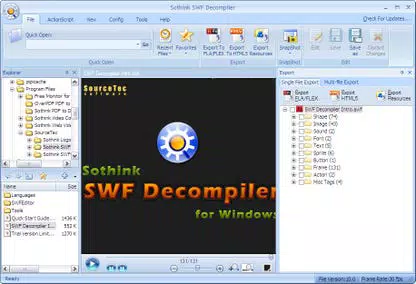
The user interface of Sothink SWF Decompiler is designed with functionality and efficiency in mind, catering to users familiar with multimedia development tools. The layout provides clear access to core features through a structured navigation system, with toolbars, file browsers, and preview windows integrated into a single workspace. Visual elements are minimalistic yet functional, prioritizing usability over decorative design. The multi-language interface supports international users, enhancing accessibility across diverse regions. Navigation is intuitive, allowing users to load SWF files, browse extracted assets, and initiate conversion or extraction processes with minimal steps. The preview window enables real-time inspection of resources before processing, improving accuracy and reducing errors. While the developer did not provide formal performance metrics, the app’s ability to handle batch processing and complex file structures suggests optimized resource management. The software operates smoothly on Windows 8 and later, indicating compatibility with modern operating systems. Responsiveness is consistent across different device categories, though specific hardware requirements were not listed. Stability appears high, given the app’s focus on precise decompilation and file conversion. The built-in player ensures seamless playback without lag or crashes, contributing to a reliable user experience. Overall, the interface balances technical depth with ease of use, making it suitable for both intermediate and advanced users.Platform Compatibility & Technical Requirements
Sothink SWF Decompiler is available exclusively for the Windows platform. It supports Windows 8 and later operating systems, ensuring compatibility with current and recent versions of the OS. The application has a file size of 26.8 MB, which is relatively lightweight for a tool of its complexity. The software version is 8.5, indicating a mature release with established functionality. The developer did not specify minimum OS requirements beyond Windows 8, nor did they list specific hardware specifications such as RAM or processor type. Compatibility information was not fully disclosed, so users should verify system readiness before installation. The app is not available on mobile platforms or macOS, limiting its accessibility to Windows-based workflows. The price point is $99.00, reflecting its specialized nature and advanced features.Pros and Cons
- Comprehensive SWF conversion to HTML5, FLA, and FLEX formats
- Extensive extraction capabilities for Flash elements including ActionScript, images, and videos
- Support for Flash CS3–CS6 and ActionScript 2.0/3.0
- Built-in Flash player for smooth playback of SWF, FLV, and F4V files
- Batch decompilation and global ActionScript search functionality
- SWF Catcher for downloading online Flash content from supported browsers
- Multi-language interface enhances international usability
- Available only on Windows, limiting cross-platform access
- Price of $99.00 may be high for casual users
- No information on mobile or macOS compatibility
- Specific system requirements were not provided
- Targeted primarily at professionals, may have a steep learning curve for beginners


